Real Guitar - Tabs and chords!
- 4.0
- Rating
- 5.00M
- Installs
- Free
- Price
 Analysis by App-foxy
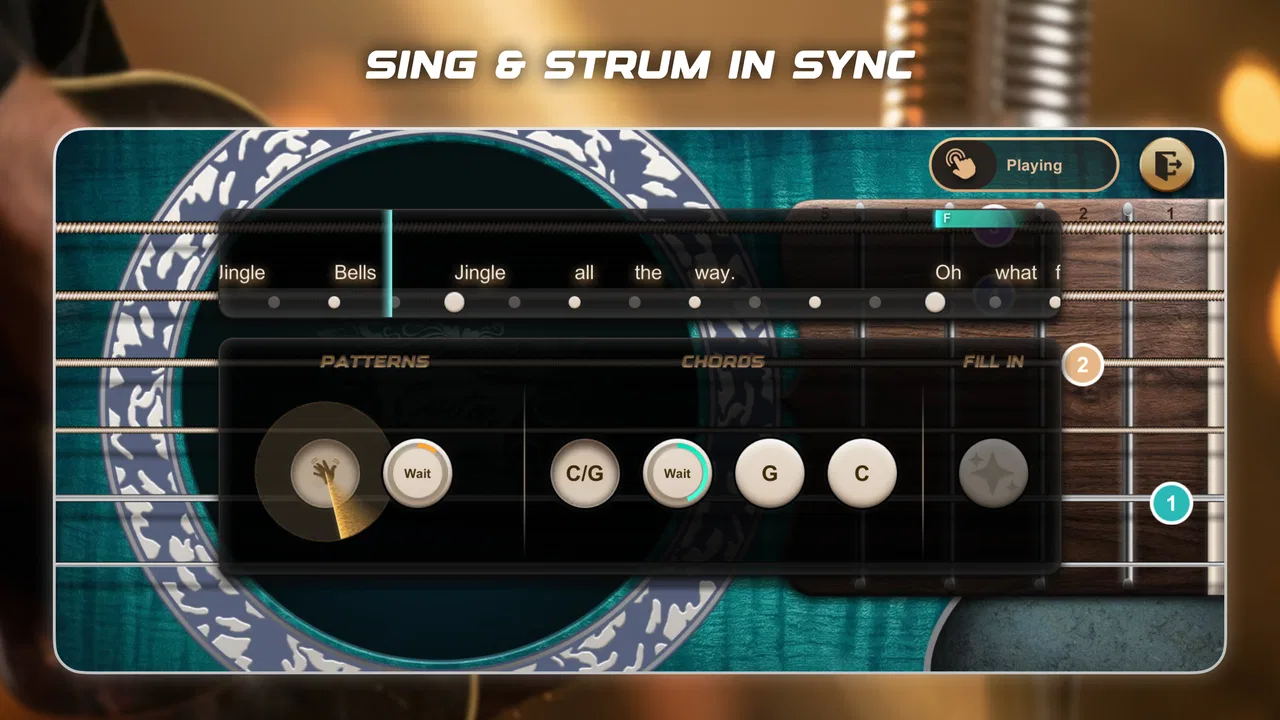
I approached Real Guitar - Tabs and chords as a quick music game rather than a replacement for a physical instrument. That distinction matters. The app is built around the familiar feeling of touching guitar strings and following chord or tab patterns on a phone, so it makes the most sense when I want a casual way to explore guitar playing without carrying a real guitar around.
It is a free game in the music category from iGroove - Game Master, with an Everyone age rating. The current release is version 2.1.4, and it runs on devices using Android 6.0 or later. Its store summary presents it as a guitar experience covering acoustic and electric styles, but the practical appeal is simpler: it gives beginners and curious players a touch-based space to experiment with chords and rhythm.
How the guitar game feels in everyday use
The first thing I noticed is that this is much easier to pick up than a traditional guitar. There is no tuning, no sore fingertip period, and no need to remember how to hold the instrument before making a sound. I can open it during a short break, choose a guitar-like setup, and start tapping through the available playing area almost immediately.
You May Also Like

 Blood Strike: 2.5 Anniversary
Blood Strike’s Loadouts Turn Every Drop Into a Tactical Gamble
A close look at Blood Strike’s custom loadouts: how fast access to signature weapons reshapes its battle royale rhythm, rewards preparation, and narrows the gap between fights.

 Pandora - Music & Podcasts
Pandora’s Music Is Easy to Start, but Harder to Recover
Pandora’s strength is its low-effort path from a seed to a station. Its weak spot is how much confidence it asks you to place in connection, setup, and quiet recovery.

 8 Ball Pool
 Is Built on Rivalries, Rematches, and Routine
A close look at the rivalries, rematches, shared routines, and unanswered safety questions that turn a quick pool match into a persistent mobile community.

 Samsung Music
’s Quiet Strength Is Playing What You Already Own
Its reach comes less from spectacle than from dependable access to a personal library. That simplicity is both the app’s strongest retention engine and its ceiling.

 AccuWeather: Weather Radar
AccuWeather Review: A Quick, Clear Forecast for Everyday Decisions
For everyday plans, the best forecast is the one you can understand quickly. AccuWeather makes rain timing, radar, and local conditions easy to act on, with a few trade-offs.

 Hill Climb Racing
Why Hill Climb Racing Still Turns Crashes Into One More Run
A tiny car, a bumpy hill and one more upgrade: Hill Climb Racing keeps resurfacing because its simple chaos makes every near-miss feel personal.
More From Our News Desk



That convenience makes it useful for small moments. I can imagine using it on a commute, while waiting for an appointment, or on a quiet evening when I want to interact with music without committing to a full practice session. It also works as a low-pressure introduction for someone who has always been curious about guitar but feels intimidated by the physical instrument.
The game format changes the experience compared with a conventional guitar-learning application. Instead of beginning with a long lesson about posture, finger placement, and technique, I get a more direct connection between an on-screen gesture and a musical result. That immediacy is enjoyable, especially for children and casual players. It also explains why the Everyone rating feels appropriate for the intended audience.
At the same time, I would not confuse the touch response with the resistance and coordination of real strings. A phone screen cannot teach the pressure needed to fret a note, the subtle movement required for clean chord changes, or the physical control of a pick. I found the app more convincing as a playful guitar simulator and rhythm activity than as a complete course for becoming a guitarist.
What the free download gives you
The important cost detail is straightforward: the game is free to download. That makes it easy to test without making a financial commitment first. I appreciate that approach here because the right question is not whether a virtual guitar can replace a real one; it is whether the touch-based experience is enjoyable and useful enough for a particular person.
There are in-app purchases priced from $3.99 to $59.99 per item. Those prices create a wide difference between free access and the most expensive optional purchase, so I would treat the free version as the starting point rather than assuming that every part of the experience is included at no cost. Anyone downloading it for a child should check the purchase settings on the device before handing over the phone.
That does not automatically make the game poor value. A free music toy can be worthwhile if I only need a few minutes of relaxed play, and the no-cost entry lets me judge that for myself. The trade-off is that a person looking for a complete, structured guitar curriculum may eventually get more value from a dedicated learning service or a real instrument, even if that alternative requires a different kind of spending.
I also like that the purchase range is visible before I decide how seriously to use the app. I can keep my expectations realistic: free access is useful for trying the basic idea, while optional spending may be aimed at people who want a broader or more sustained experience. I would not buy anything immediately. I would first spend enough time with the free portion to see whether the controls feel natural and whether the available material matches my goals.
Where it delivers genuine value
The strongest value is accessibility. A physical guitar demands space, maintenance, tuning, and a willingness to make mistakes loudly. This game removes most of that friction. For a complete beginner, that can be the difference between experimenting for five minutes and abandoning the idea before making a first chord.
It can also be useful as a visual reminder of chord shapes or tab-style patterns. I would use it as a preparation tool: look at a progression on the screen, listen to how the changes fit together, and then move to a real guitar when I have one available. That workflow is more realistic than expecting the app alone to build finger strength or accurate fretting technique.
Another practical use is songwriting exploration. If a melody or chord movement occurs to me away from home, a touch-based guitar can help me test the general musical direction before I forget it. The result will not have the same expressive detail as a real performance, but it can preserve an idea. For casual composition, that is a meaningful benefit.
I also see value in using it as a shared activity. A parent can let a child try different sounds without worrying about damaging a physical instrument, while friends can pass the phone around and compare simple patterns. Because the game is in the music category rather than presented as a formal academic tool, it feels more approachable for people who want interaction first and instruction second.
The large existing audience supports that sense of accessibility. The game has passed five million installs and carries an average rating of 3.9 from about 9,400 ratings. I read those figures as evidence that the concept has broad appeal, not as proof that every player will enjoy it. The rating is respectable but not exceptional, which fits an app with a clear casual purpose and some limits compared with specialist alternatives.
Small techniques that make the experience more useful
My first practical tip is to use short, deliberate sessions instead of treating the app like a full practice room. I get more from choosing one chord sequence or one rhythm idea and repeating it carefully than from tapping randomly across the screen. That turns casual play into a small listening exercise and makes it easier to notice whether I actually understand the pattern.
A second useful workflow is to separate memorization from performance. I can study a chord or tab arrangement visually, close my eyes for a moment, and then try to reproduce the sequence from memory. This does not recreate real finger placement, but it does test whether I am following the musical order rather than simply reacting to the next highlighted prompt.
I would also recommend using headphones in situations where other people are nearby. A guitar simulator is more enjoyable when I can hear the difference between a clean change and a rushed one, and private listening makes it less disruptive in a shared room. This is especially helpful when repeating the same passage several times.
For people who own a physical guitar, the best approach is to pair the two tools. I might use the app to remember a progression, then pick up the real instrument and concentrate on finger pressure, timing, and tone. If the physical version feels difficult, I can return to the app to simplify the musical idea before trying again. That makes the game a support tool rather than a substitute.
There is another small advantage for complete beginners: the screen can make the first encounter feel less embarrassing. Someone who is nervous about producing unpleasant sounds on a real guitar can experiment privately and learn the basic logic of chord movement first. Once confidence improves, moving to a real instrument becomes less mysterious, even though the physical learning curve remains.
The trade-offs behind the simple controls
The same simplicity that makes the game welcoming also limits its depth. Touching a screen is forgiving, but guitar technique is not. I cannot build calluses, learn how to mute unwanted strings, or develop the subtle timing that comes from coordinating both hands on a real instrument. If my main goal is serious musicianship, I would choose a structured guitar course, a tutor, or a real guitar with a clearly planned practice routine.
The game approach may also disappoint players who want detailed music theory. Chords and tabs can show what to play, but they do not automatically explain why a progression works, how to transpose it, or how to create a convincing arrangement. I would need another learning source for those questions. The app is better at immediate interaction than at giving a complete musical education.
There is a difference between hearing a chord and controlling its character. On a real guitar, I can change the sound with picking position, attack, pressure, muting, and timing. A touch interface naturally compresses those choices. That makes it pleasant for casual play but less satisfying for an experienced guitarist who wants expressive control.
The purchase structure is another point to consider. Since the game is free but includes optional items ranging from $3.99 to $59.99, I would avoid judging its value solely by the download price. A person who remains happy with the free experience may find it worthwhile, while someone who expects a full feature set without additional spending should examine the available content carefully before buying.
The store information also identifies 63 reviews alongside the broader rating activity. I would place more weight on trying the controls personally than on assuming that the average response predicts my experience. Touch sensitivity, screen size, patience with game-style interaction, and musical expectations can change the result considerably.
Who is most likely to enjoy it
I think this game is a good fit for curious beginners, children, casual music fans, and existing guitar players who want a lightweight way to review chord ideas. It is particularly appealing to people who do not own a guitar yet but want to find out whether interacting with one feels interesting before buying an instrument.
It also suits someone who wants a portable musical distraction rather than a demanding lesson. If I have only a few minutes, the low setup effort is a real advantage. I can explore a pattern without finding a quiet practice space, tuning strings, or setting up equipment.
People who should skip it are players seeking professional-level sound control, detailed theory lessons, or a complete path from beginner to advanced guitarist. A real guitar, a teacher, or a specialized learning app will be the better choice in those cases. I would also skip it if I dislike tapping games or find simulated instruments less satisfying than physical ones.
My final recommendation
My verdict is positive, with a clear boundary around what I expect from it. Real Guitar - Tabs and chords is a friendly free entry point into guitar-style play, and its acoustic and electric framing gives the experience more variety than a bare chord reference. The free download makes experimentation easy, while the Everyone rating and simple approach make it approachable for a broad audience.
I would recommend installing it if I wanted a casual music game, a portable way to explore chord patterns, or a gentle first step before touching a real guitar. I would not recommend treating it as the only tool for learning guitar technique. Its best role is as a convenient companion: useful for ideas, repetition, and confidence, but not a replacement for physical practice.
Before spending money, I would use the free access long enough to answer three personal questions: do the touch controls feel comfortable on my device, do I enjoy the game-style approach, and does it help with the kind of music I want to explore? If the answer is yes, optional purchases may offer worthwhile added value for continued use. If the answer is no, a conventional lesson app or an inexpensive real instrument will probably serve me better.
For me, that makes the game worth trying rather than an automatic purchase. It succeeds because it removes the intimidating parts of beginning with guitar and replaces them with immediate, low-pressure interaction. Its limitations are equally clear, but they do not undermine its purpose. As a free musical playground and a bridge toward real guitar practice, it earns a place on the shortlist.
FAQs for Real Guitar - Tabs and chords!
01What features does Real Guitar - Tabs and Chords offer?
Real Guitar - Tabs and Chords offers a comprehensive range of features, including a wide variety of chords and tabs, high-quality sound, and realistic guitar simulations. Users can practice with a metronome and record their sessions. The app also provides tutorials for beginners to help improve their skills.
02Is Real Guitar - Tabs and Chords suitable for beginners?
Yes, Real Guitar - Tabs and Chords is highly suitable for beginners. It includes step-by-step lessons and tutorials designed to help new players learn the basics of guitar playing. The intuitive interface and easy navigation make it accessible for users who are just starting out.
03Does the app require an internet connection to function?
Real Guitar - Tabs and Chords can be used offline, which is great for practicing on the go. However, certain features, like downloading new tabs or accessing online tutorials, may require an internet connection. Offline functionality ensures users can play anytime, anywhere without disruption.
04Are there any in-app purchases or ads?
While Real Guitar - Tabs and Chords is free to download, it does contain in-app purchases. These purchases can unlock additional features, such as advanced lessons or ad removal. Users should be aware that the free version may include ads, which can be removed by opting for the premium version.
05What devices are compatible with Real Guitar - Tabs and Chords?
Real Guitar - Tabs and Chords is compatible with both Android and iOS devices. It runs smoothly on most smartphones and tablets, ensuring a wide range of user accessibility. Users should check for the latest updates to ensure optimal performance on their specific devices.
Pros
- User-friendly interface for beginners.
- High-quality sound reproduction.
- Wide range of chords and tabs.
- Customizable metronome feature.
- Offline access to lessons.
Cons
- Ads can be intrusive during use.
- Limited free content availability.
- Occasional app crashes reported.
- Requires in-app purchases for full access.
- May have a steep learning curve for some.

Real Guitar - Tabs and chords!
Gallery